
Modern Inspiration for Your Monthly Report PowerPoint Presentation
Delivering performance updates to management and stakeholders requires a clean layout that highlights key metrics without clutter. A well-structured monthly report PowerPoint presentation uses minimalist visual hierarchy, balanced spacing, and structured content cards to present complex KPIs effortlessly. In this showcase, explore a complete 10-slide corporate monthly report design that applies modern executive presentation standards to deliver maximum impact.
Video Showcase: 10 Executive Monthly Report Slide Examples
Watch the full video demonstration below to see all 10 minimal slide layouts in action:
1. Structure of an Executive Reporting Deck
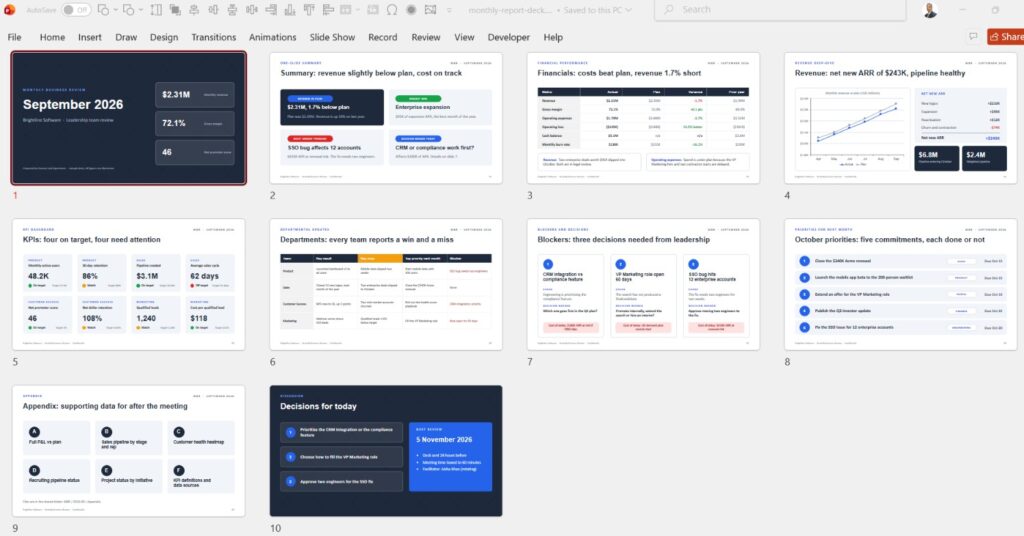
A complete monthly performance review should guide leadership smoothly from top-line highlights down to operational details. This 10-slide showcase highlights essential reporting sections:
- Slide 1: Title Card & Review Period: Bold header structure clearly establishing the month, department, and reporting scope.
- Slides 2–3: Executive Summary & High-Level KPIs: Big number callouts and metric cards highlighting core revenue and growth targets.
- Slides 4–5: Financial Performance & Budget Breakdown: Multi-column card containers organizing income, expenses, and variance figures.
- Slides 6–7: Project Status & Departmental Milestones: Progress trackers and structured status cards separating achievements from operational roadblocks.
- Slides 8–10: Key Challenges, Team Output & Next Month Roadmap: Clear action items and upcoming milestones closing the deck with strategic direction.
2. Core Design Principles for Corporate Monthly Report Design
Analyzing these 10 slide examples reveals key rules that make executive reporting slides readable and actionable:
Mapping Colors to Theme Palettes for Instant Brand Consistency
Linking all card containers, borders, and headline text to PowerPoint’s internal Theme Palette ensures brand consistency across all 10 slides. Updating colors across the entire deck takes a single click.
Organizing Financial Data with Visual Container Cards
Placing numbers and status points inside light shape containers prevents data points from bleeding together across wide monitors.
3. Best Practices in These Monthly Report Slide Examples
Examining these monthly report slide examples demonstrates how whitespace and strict alignment work together to reduce visual fatigue:
- Strict Grid Alignment: Text blocks, status icons, and container edges align along a shared vertical and horizontal grid.
- Restrained Typography Hierarchy: Using bold headers for scanning paired with light body text ensures quick readability during meetings.
- Purposeful Status Indicators: Icons and status badges serve as visual anchors for rapid data absorption.
Key Takeaways from This Executive Reporting Deck Showcase
Studying high-caliber slide examples helps establish a benchmark for your regular business updates. By adopting minimalist card structures, strict grid alignment, and disciplined color schemes, you can transform dense monthly data into an executive-ready corporate presentation.
For more PowerPoint turorials, check this Youtube Playlist
And here you can search for Jobs for Presentation and PowerPoint designers