
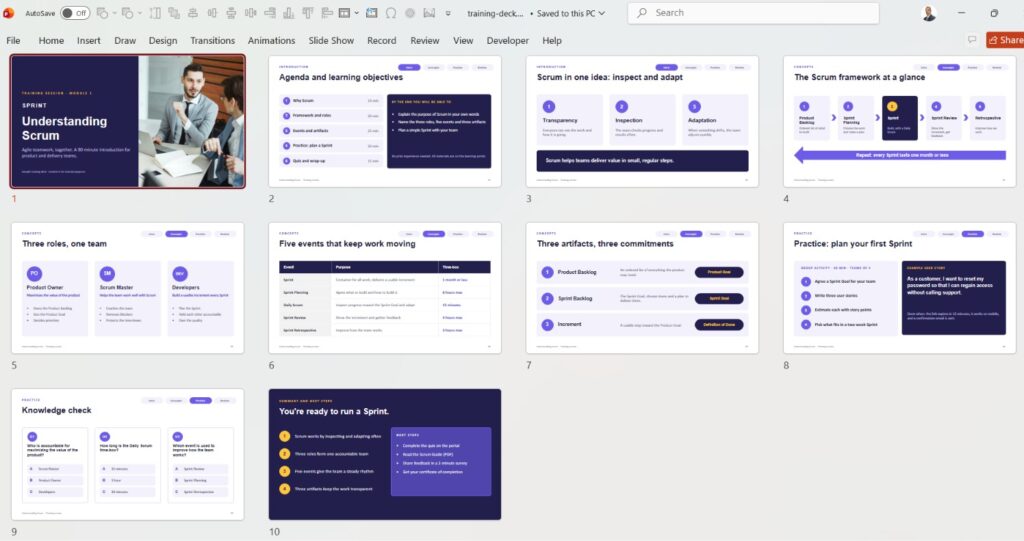
In this video showcase, take an exclusive look at a 10-slide professional Training Deck PowerPoint Presentation designed to deliver complex instructional content with clarity, visual balance, and engaging structural layouts.
Effective educational sessions and corporate training events require structured content pacing, high legibility, and active visual engagement. Designing an impactful corporate training deck design demands a strong understanding of cognitive load management, visual hierarchy, and functional slide architecture. When building professional powerpoint slides for workshops or onboarding programs, utilizing tested training deck slide ideas helps keep learners focused from start to finish.
Key Features of an Effective Training Deck PowerPoint Presentation
A successful corporate training presentation must guide learners seamlessly through complex concepts, maintain attention throughout workshops, and reinforce knowledge retention. Incorporating essential slide design strategies ensures your educational deck meets modern professional standards:
1. Visual Hierarchy in Training Deck PowerPoint Design
Every slide directs the learner’s focus to primary learning objectives and core takeaways before presenting secondary explanation text. Using bold typography contrasts, clear bulleted grids, and strategic spacing reduces cognitive friction when presenting professional powerpoint slides.
2. Color Schemes for Training Deck Slide Ideas
Utilizing clean, accessible color schemes with high-contrast accent highlights emphasizes critical rules, framework steps, and actionable tips without overwhelming the audience.
3. Functional Layouts for Corporate Training Deck Design
Replacing dense, text-heavy paragraphs with multi-column module cards, visual process flows, and structured info-boxes makes instructional data easy to absorb and recall.
10 Training Deck PowerPoint Slide Concepts Included in the Showcase
- Title & Workshop Cover Slide: A bold visual opening setting the course topic and session expectations.
- Learning Objectives & Agenda: A structured multi-card grid outlining session milestones.
- Core Concept Framework: An organized visual matrix explaining foundational theories.
- Step-by-Step Instructional Workflow: A horizontal process flow guiding learners through operational steps.
- Interactive Case Study Breakdown: A side-by-side comparison layout analyzing real-world scenarios.
- Data & Key Statistics Highlight: Numerical callout boxes highlighting essential research points.
- Best Practices Checklist: A visual summary list utilizing clear vector icon indicators.
- Do’s and Don’ts Comparison Grid: A dual-column matrix contrasting proper vs. improper practices.
- Knowledge Check & Quiz Slide: An engaging, question-focused layout encouraging participant interaction.
- Summary & Action Plan: A focused takeaway slide framing next steps and implementation tools.
How Training Deck PowerPoint Presentation Design Improves Learning Retention
When workshop presentations are visually structured and uncluttered, participants retain information significantly better and engage more during live sessions. Applying consistent layout standards across all 10 slides demonstrates how simple design choices elevate corporate training materials from plain lectures to dynamic learning experiences.
For more Professional PowerPoint Presentation Design and turorials, check this Youtube Playlist
And here you can search for Jobs for Presentation and PowerPoint designers